Thứ Sáu, 27 tháng 4, 2012

Tạo máy in ảo PDF reDirect Professional v2.5.2 is now available (20 Nov 2010)

CHƯƠNG TRÌNH TẠO MÁY IN ẢO ĐỂ IN RA FILE PDF FREE ^^

PDF reDirect Professional v2.5.2 is now available (20 Nov 2010) for download. This version is officially released.

DOWNLOAD
  • The upgrade from v2.5.0 to v2.5.2 is [HERE] (2.2MB)
  • The full v2.5.2 installation program is [HERE] (7.1 MB)
  • Notes:
    1. You can use this installation program to upgrade your existing installation (ie, no need to remove the old version first).
    2. The installation program, and all files included have been scanned by a virus checker. The report is shown in the next post

WHAT's NEW with v2.5.2 (since v2.5.0)

   The biggest news is (by customer request) the conversion of the Save button into a multi-function button where you can change what the button is used for.
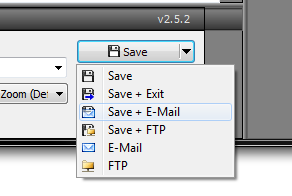

Here is the full list of changes:
  • NEW: User can now e-mail or FTP directly from the Main Save Button.
  • FIXED: "Invalid Treenode" error when opening a PDF which had page 1 extracted from the original PDF.
  • FIXED: Bug that showed an error message when Command Line contained a filename exactly 3 letters long.
  • FIXED: Minor typo in French language file.
  • FIXED: Upgrade not running automatically after download is completed.
  • IMPROVED: Updated the Portuguese-BR language file (thanks to Luciano K).
  • IMPROVED: Made default the "Overwrite Existing File (Give Warning)" setting for new installations.
  • DOCUMENTATION: Added instructions for IT Administrators for network/server installation.
  • DOCUMENTATION: Mentioned  that silent "/S" install switch must be capitalized instructions in the help file.
WHAT's NEW with v2.5.0 (since v2.2.8)

   Actually, there have been quite a few changes. Here are the highlights. Please see the next posts for the full list.
  • New user interface (much cleaner for the Pro version)
  • Completely re-worked the FTP and e-mail features so that it is more logical and easier to use.
  • Added a dropdown to access recently created PDF files so that it's easier to navigate to it's folder
  • Added the ability to specify the startup page of the PDF
  • Added quick access (basic and advanced) to the printer properties
  • Added support for unicode (for languages that need this)
  • Added the ability to create your own custom page sizes
  • Added stamp transparency and outline options
  • Added Explorer style context menus (ie you can now right-click on files)
  • Added the ability to view files as thumbnails in addition to a list
  • Added newer 128 bit AES security encryption
  • Added dropdowns for metadata so that you do not need to retype recently used text
  • Added support for Adobe Distiller v8 and v9 conversion engine
  • Added the option to copy the path of the newly created PDF file into the clipboard (so that it's easier to add the PDF to an e-mail in Outlook for example).
  • Added the option to minimize to the systray
  • Added Batch Printer sharing options
  • Added <UID> and <PCID> codes to the automatic batch printer naming so that you can have the name of the user added to the filename created.

COMPATIBILITY
  • Compatible and tested with Windows 2000, XP, Vista and 7
    • It is compatible with 32 and 64 bit versions of Windows
  • Note: this version is not compatible with Windows NT, 95, 98SE, or ME. Please continue using the old versions for those.
LANGUAGES
  • Please Contact us if you wish to develop a new language to make sure that someone else is not working on one. Current supported languages include:
    • English
    • French
    • Spanish
    • Italian
    • Czech
    • Chinese (Simplified)
    • Japanese
    • German
    • Dutch
    • Norwegian
    • Swedish
    • Portuguese
    • Magyar
Michel Korwin-Szymanowski
EXP Systems LLC

Java cho máy tính của bạn : Java Version for your Computer

Verify Java Version for your Computer at (Xác minh Phiên bản JAVA cho máy tính của bạn) >> http://java.com/inc/BrowserRedirect1.jsp?locale=en


Learn About Java Technology

To date, the Java platform has attracted more than 6.5 million software developers. It's used in every major industry segment and has a presence in a wide range of devices, computers, and networks.
Java technology's versatility, efficiency, platform portability, and security make it the ideal technology for network computing. From laptops to datacenters, game consoles to scientific supercomputers, cell phones to the Internet, Java is everywhere!
  • 1.1 billion desktops run Java
  • 930 million Java Runtime Environment downloads each year
  • 3 billion mobile phones run Java
  • 31 times more Java phones ship every year than Apple and Android combined
  • 100% of all Blu-ray players run Java
  • 1.4 billion Java Cards are manufactured each year
  • Java powers set-top boxes, printers, Web cams, games, car navigation systems, lottery terminals, medical devices, parking payment stations, and more.
To see places of Java in Action in your daily life, explore java.com.

Why Software Developers Choose Java

Java has been tested, refined, extended, and proven by a dedicated community. And numbering more than 6.5 million developers, it's the largest and most active on the planet. With its versatilty, efficiency, and portability, Java has become invaluable to developers by enabling them to:
  • Write software on one platform and run it on virtually any other platform
  • Create programs to run within a Web browser and Web services
  • Develop server-side applications for online forums, stores, polls, HTML forms processing, and more
  • Combine applications or services using the Java language to create highly customized applications or services
  • Write powerful and efficient applications for mobile phones, remote processors, low-cost consumer products, and practically any other device with a digital heartbeat

Some Ways Software Developers Learn Java

Many colleges and universities offer courses in programming for the Java platform. In addition, developers can also enhance their Java programming skills by reading Oracle's Java developer web site, subscribing to Java technology-focused newsletters, using the Java Tutorial and the New to Java Programming Center, and signing up for Web, virtual, or instructor-led courses.
OTN logo The Oracle Technology Network is the world's largest community of application developers, database admins, system admins/developers, and architects using industry-standard technologies in combination with Oracle products. It is also the home of oracle.com/technetwork/java, the ultimate, complete, and authoritative source of technical information about Java. Membership is free, join today! (In your Profile, check the Oracle Technology Network box under My Community Memberships.)

What Is JavaFX

JavaFX logo JavaFX extends your web experience by delivering rich media and content across all the screens of your life. As users, you will be able to run JavaFX applications in a browser or drag and drop them onto the desktop. It's a seamless interface!
JavaFX is powered by Java: JavaFX extends the power of Java by allowing developers to use any Java library within JavaFX applications. This way developers can expand their capabilities in Java and make use of the revolutionary presentation technology that JavaFX provides to build engaging visual experiences.
Highlights of JavaFX:
  • Allows users to view JavaFX applications in a browser or break free of the browser by dragging and dropping the same application onto the desktop
  • Enables an efficient designer-to-developer workflow with Project Nile: designers can work in their tools of choice while collaborating with Web scripters who use the NetBeans IDE with JavaFX
  • Extends Java technology by enabling use of any Java library within a JavaFX application
  • Allows developers to integrate vector graphics, animation, audio, and video Web assets into a rich, interactive, immersive application
To learn more about JavaFX technology, visit JavaFX web site for more information.
Back to top
Select Language | About Java | Developers
Privacy | Terms of Use | Trademarks | Disclaimer

Adobe Flash Player


Adobe® Flash® Player is a cross-platform browser-based application runtime that delivers uncompromised viewing of expressive applications, content, and videos across screens and browsers.
Flash Player is optimized for high performance on mobile screens and designed to take advantage of native device capabilities, enabling richer and more immersive user experiences.
For more information visit the Product Page


Xóa chương trình sạch sẽ với IObit Uninstaller


IObit Uninstaller 2

(http://www.iobit.com/advanceduninstaller.html)


Removing unwanted apps has never been so easy!

IObit Uninstaller helps you uninstall and remove unwanted programs and folders from your computer fast and easily. Where the built-in and sluggish "Windows Add or Remove Programs" option fails, IObit Uninstaller works as always and picks up the slack. What's better, it is a free Uninstaller without installation.

Key Benefits
[+] See all

Standard and Advanced Uninstall
While Standard Uninstall works as the Windows built-in Add/Remove Programs function, Advanced Uninstall function helps you scan Windows registry and hard drive for any possible installation leftovers.
Enhanced "Powerful Scan" Enhanced
Now the "Powerful Scan" gives you a deeper and more secure scan, especially for the leftover items in Registry.
Batch Uninstall
Uninstall several applications so easily with just one click.
Search unwanted program in "Forced Uninstall" New!
Now you can search programs' names in "Forced Uninstall" and uninstall them directly in the search results.

IObit Uninstaller Product Specs

Current Version: 2.1
File Size: 1.57 MB
Operating System: Designed for Windows 8, Windows 7, Vista, XP and 2000
Release Date: Dec. 09, 2011
Designed to: Uninstall Software.
Languages: Bulgarian, ChineseSimplified, ChineseTrad, Czech, Danish, English, Finland, French, German, Hungarian, Italian, Japanese, Korean, Polish, Russian, Spanish, Swedish, Turkish, Vietnamese.

Thứ Năm, 12 tháng 4, 2012

Chương trình Wireless Network Watcher

Homepage:  >> http://www.nirsoft.net/

>> Đây là phần mềm miễn phí để bạn theo dõi xem có những ai đang xài mạng WIFI cùng với bạn. Ví dụ như ở quán cà phê hay wifi công cộng mà bạn kết nối thành công!

Link download :   Wireless Network Watcher v1.41 20/03/2012


and more : ^^

WakeMeOnLan v1.30 08/04/2012 Update: OutlookAttachView v2.25 06/04/2012 Update: Wireless Network Watcher v1.42, ChromeCacheView v1.40, SafariCacheView v1.10 05/04/2012 Update: NK2Edit v2.06 02/04/2012 New: ExifDataView v1.00 29/03/2012 Update: CSVFileView v1.30, FirefoxDownloadsView v1.31 28/03/2012 Update: MyLastSearch v1.55, RegDllView v1.45 27/03/2012 Update: VideoCacheView v2.15, Password Security Scanner v1.05 24/03/2012 Update: DomainHostingView v1.21, WhoisThisDomain v1.76 21/03/2012 Update:  Update: NetworkTrafficView v1.31, DriveLetterView v1.12 19/03/2012 Update: OutlookAttachView v2.20 18/03/2012 Update: ShellExView v1.70, USBDeview v2.06, USBLogView v1.10

NirSoft web site provides a unique collection of small and useful freeware utilities, all of them developed by Nir Sofer.
If you are looking for Windows password-recovery tools, click here.
If you are looking for network tools, click here.
To view your IP address and other information, click here.
To view all major IP address blocks assigned to your country, click here.
To read the Blog of NirSoft, click here.

See also: Video Streaming Capture Tools, Windows Registry Tools, Domain/IP Lookup Tools

Free My Lockbox: Khóa thư mục

Keep your private files in a password protected folder

My Lockbox™ enables you to hide, lock and password protect almost any folder on your computer. You can use My Lockbox to hide your private data from prying eyes - your files will be not accessible both from local and remote users.

The easiest way to protect a folder

During the installation of My Lockbox, you will be asked to provide the location of the protected folder. On completion of the installation, your folder will become hidden and locked.
My Lockbox Control Panel
Read Quick Start Guide

Features and benefits

  • Extremely easy in use.
  • Hotkey to open Control Panel with a simple keystroke.
  • Effective password protection.
  • FAT, FAT32, NTFS volumes are supported.
  • Supports all modern Windows operating systems (XP, Vista, 7) including 64-bit editions.
  • Almost any folder on your computer can be password protected.
  • Prevents you from locking system-critical folders, e.g. C:\Windows.
  • Instant protection - no file scrambling or moving to another place.
  • Trusted processes feature lets backup, antivirus or similar software to backup or scan your protected folder.
  • Protects folders even in Windows safe mode.
  • Skinned user interface.
  • Freeware *
* Can be upgraded to My Lockbox Professional edition which enables you to protect any number of folders.
Download My Lockbox
Upgrade to My Lockbox Pro Now!

Addon : MEMORY FOX for Firefox

TIỆN ÍCH GIẢM RAM KHI DÙNG FIREFOX


You search the addon : Memory Fox in here : https://addons.mozilla.org/vi/firefox/   and install this for your FireFox. 
I think you very interesting with addon because the RAM will resduce very greate !!! 
Have fun! thanks for reading my Blog : maytinhcuatui.blogspot.com